

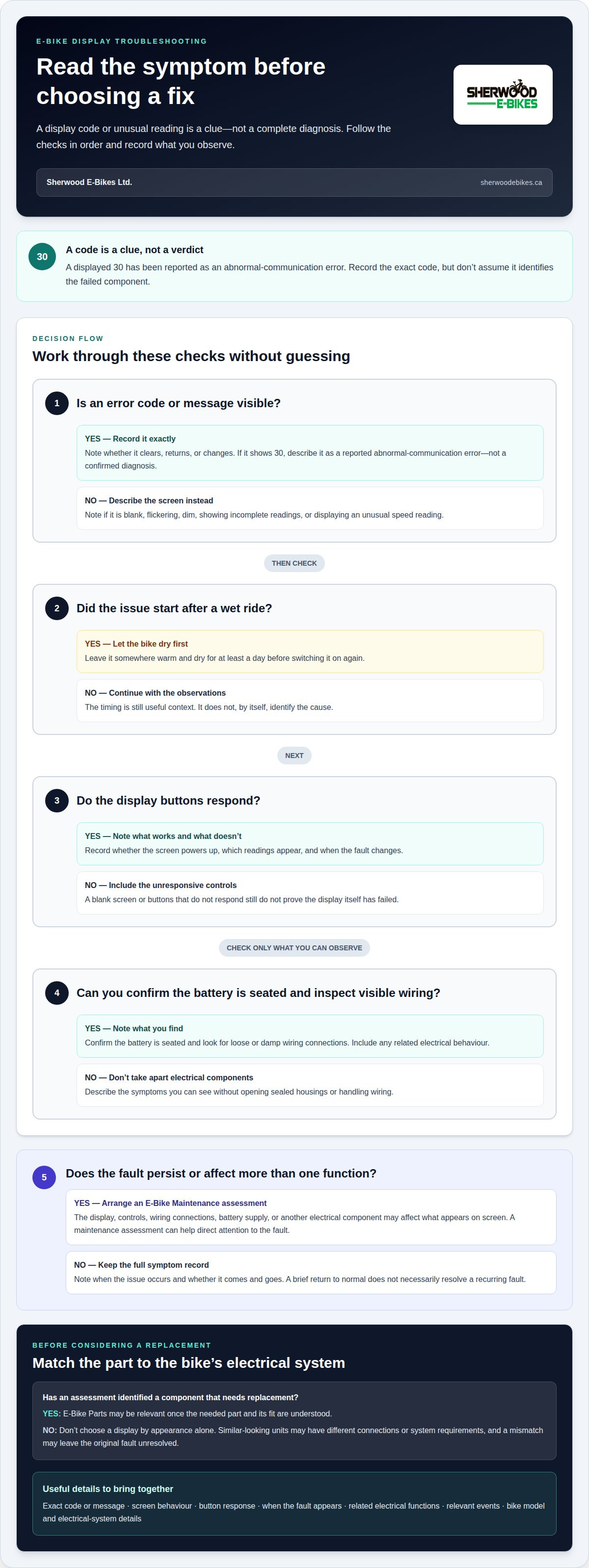
What does an e-bike display error code actually tell you? A displayed 30 has been reported as an abnormal-communication error, while a blank screen or inaccurate speed reading can point to a different issue. The code is a useful clue, not a complete diagnosis.
A display that stops working can make a ride feel uncertain, especially when you rely on its speed and battery readings. If your Rad Power bike display is not working in Vegreville, start with safe, simple checks: note any error code, test the buttons, confirm the battery is seated, and look for loose or damp wiring. If the display behaved strangely after a wet ride, leave the bike somewhere warm and dry for at least a day before switching it on again.
This guide explains how to interpret error messages and check readings, controls, battery connections, firmware, wiring, and replacement compatibility. You will also learn when a reset may help and when a persistent fault calls for professional service from Sherwood E-Bikes Ltd. rather than more trial and error.
Key Takeaways
- Use display error codes as clues to narrow down a fault, rather than treating them as a complete diagnosis.
- Learn how to assess unusual speed readings and unresponsive buttons with practical checks.
- Find out what to inspect around battery seating, wiring connections, and moisture before trying a reset.
- Understand why firmware and display replacement compatibility matter when troubleshooting continues.
- See how Sherwood E-Bikes’ maintenance, parts, commuter e-bikes, and cycling accessories can support your next step.
Sherwood E-Bikes
Sherwood E-Bikes Ltd. is a practical next step when basic display checks haven’t explained the fault, or when the screen, controls, or electrical connections need closer assessment. A display problem can make it harder to read ride information and understand how the bike is operating. E-Bike Maintenance is relevant when the issue persists or affects more than one function. E-Bike Parts may be appropriate if an assessment identifies a component that needs replacement. Cycling Accessories and Commuter E-Bikes address separate needs related to how you ride.
Start by describing the behaviour rather than deciding that the display itself has failed. Does the screen stay blank, switch off intermittently, show an error, or display unusual readings? Do its buttons respond? Does the issue occur when the bike starts or appear later? These observations help frame the problem. A display is part of an electrical system, so a screen symptom doesn’t automatically identify the cause.
E-Bike Maintenance can help assess a persistent fault instead of relying on repeated resets or guesswork. The display, controls, wiring connections, battery supply, and other electrical components can all affect what appears on the screen. Considering the symptoms together helps direct attention to the issue that needs work. Depending on the findings, the next step may involve maintenance or a suitable part.
Useful details include the exact message or code shown, when the problem occurs, whether it comes and goes, and what changed before it began. A screen that stays blank from startup differs from one that powers on and then cuts out. That distinction doesn’t diagnose the fault, but it gives a maintenance assessment a clearer starting point.
If the fault continues, the display is damaged, or the bike’s electrical system behaves unpredictably, turn to E-Bike Maintenance rather than making further adjustments without a clear reason. Maintenance is the relevant route for assessing and addressing a bike issue. If the assessment identifies a component need, E-Bike Parts can support that next step.
Start with the symptom, not the replacement
A malfunctioning display can make replacement seem like the straightforward answer. But a blank screen, warning message, or inconsistent reading doesn’t prove the display is the failed component. The cause may be the screen, a connection, the battery supply, or another part of the electrical system. Assessing the symptoms first helps determine whether a replacement display is appropriate.
Electrical components must suit the bike’s system. A display that looks similar to another unit may have a different connection or system requirement. Choosing by appearance alone may lead to a mismatch or leave the original fault unresolved. The bike and its electrical setup matter when considering any replacement part.
When explaining the problem, describe what you observe without guessing at the cause. Note whether the display powers up, whether the buttons respond, what readings appear, and when the behaviour changes. If a message appears, record it exactly. If the screen works intermittently, explain when it stops responding. These details are more useful than a guess that a particular component has failed.
A maintenance assessment can help organize the decision around three points:
- What is the display doing? Describe the visible behaviour, such as a blank screen, incomplete readings, or a warning message.
- What else is affected? Other electrical functions or controls may help show whether the problem appears limited to the display.
- What would address the cause? The answer depends on the symptoms and the bike’s system, not just the appearance of a potential replacement.
This sequence keeps the focus on the actual fault. Changing parts without a reason can raise compatibility questions and make it harder to assess whether the original issue remains. If the assessment points to a component, E-Bike Parts become relevant once the needed part and its fit are understood.
Your riding needs can inform the discussion, but they don’t replace technical compatibility. A rider who depends on clear display information for regular trips may have different priorities from someone who uses the bike occasionally. Those priorities help explain what the bike needs to do. Any replacement still has to suit the bike’s electrical system.
Make the reported fault easier to assess
Before seeking maintenance, gather the details you can observe without taking apart electrical components. You don’t need to open sealed housings or handle wiring to report what the bike is doing. A clear description of the symptoms and the events around them can help focus the assessment.
- Describe the screen. Note whether it’s blank, flickering, dim, showing incomplete readings, or displaying a message.
- Explain when the fault appears. Say whether it happens at startup, during a ride, after parking, or only from time to time.
- Include related behaviour. Mention whether buttons respond and whether other electrical functions seem affected.
- Share relevant events. If a wet ride, impact, storage change, or adjustment happened before the fault, include it as context.
- Identify the bike. Provide its model details and any available information about its electrical system or past component changes.
These observations help describe whether a fault is constant or appears only under certain conditions. They also make it easier to discuss whether maintenance or a part is the relevant next step. A display that sometimes powers on can still have a recurring fault, so include intermittent behaviour in your description rather than treating a brief return to normal as a resolution.
If an error appears, record the characters exactly as shown. A general description such as “there’s an error” leaves out information that may help direct the assessment. Note whether the message clears, returns, or changes. Treat it as one clue alongside the bike’s other symptoms, not as an automatic instruction to replace a particular component.
For unusual readings, describe what appears and the circumstances in which you notice it. A displayed value can be affected by an issue elsewhere in the system, so changing settings without understanding the cause may not help. Maintenance can consider the readings alongside the display controls, connections, and other signs of a fault.
When a part or accessory may be relevant
E-Bike Parts are relevant when an assessment identifies a component that needs replacement. The part must suit the bike’s electrical system and connection requirements. A similar appearance doesn’t establish compatibility. Identifying the bike and affected component first helps keep the decision focused on fit and function.
This is why a symptom should lead to an assessment before it leads to a purchase. A maintenance assessment can connect the reported behaviour to a possible component need. If a compatible display or related part is appropriate, the decision follows from the bike’s system and the findings, rather than the assumption that displays are interchangeable.
Cycling Accessories serve a separate purpose. They can support your riding setup, but they don’t correct an electrical fault. If the screen is unreliable, an accessory won’t resolve the underlying issue. Address the display problem through maintenance first, then consider accessories that meet a practical need in your regular riding.
Keeping these needs distinct makes the next step clear. E-Bike Maintenance addresses a fault that needs assessment. E-Bike Parts address an identified component requirement. Cycling Accessories support the ride in other ways. The relevant option depends on whether you’re dealing with an ongoing fault, a part need, or a separate equipment choice.
Previous repairs or component changes can affect the current setup. If the bike has had electrical parts changed or other modifications, mention that history when describing the fault. This context can help explain why the system may behave differently from an unmodified setup. Share what you know without assuming a past change caused the current issue.
Consider your riding needs after the fault is understood
A display issue may prompt a broader question about whether your current bike still suits your regular travel. Keep that decision separate from diagnosing the fault. A display problem may have a maintenance solution, while a change in how or where you ride may make a different bike worth considering.
Commuter E-Bikes are relevant if your needs have shifted toward regular transportation. Consider the routes you ride, the riding position you prefer, and how you plan to use the bike day to day. These details help focus a bike choice on practical function. They don’t make a new bike an automatic fix for an electrical fault on your current one.
First understand what is happening with the display and what work may address it. Then decide whether the bike continues to suit your routine. A screen problem alone doesn’t establish that the whole bike needs replacing. Likewise, a commuter bike addresses a different need from maintenance on a bike with an electrical issue.
For riders in Vegreville and the surrounding area, a clear description of the symptoms, the bike, and its intended use gives the conversation a useful starting point. It avoids assumptions about what caused the problem or what should replace a component. From there, the next step can match the actual need, whether that is maintenance, a suitable part, an accessory, or a commuter bike.
Keep the decision focused on function. If the bike needs an electrical fault assessed, E-Bike Maintenance is the relevant offering. If an assessment identifies a component, E-Bike Parts may be the next step. If your riding priorities have changed, Commuter E-Bikes may be worth considering. Cycling Accessories are for separate equipment needs, not for correcting a display fault.
When the issue persists, affects riding, or remains unclear after basic checks, avoid repeated adjustments without a clear diagnosis. A focused assessment can help determine whether the problem relates to the display or another part of the system. Once the cause is better understood, it’s easier to consider the appropriate maintenance or part instead of making a replacement decision based on one symptom.
If you’d like help with an e-bike display issue or the next step for your riding setup, contact Sherwood E-Bikes Ltd.
Frequently Asked Questions
What do error codes on the display mean?
Error codes are messages from an e-bike’s electrical system that help identify the type of fault it has detected. Their meaning depends on the system and exact code, so don’t assume a message identifies a failed display. For example, a communication-related code points to information not passing correctly between components. Note whether the message is steady or intermittent and whether other functions change at the same time.
Why is my e-bike display not turning on?
A display may not turn on if the battery isn’t supplying power, a connection is interrupted, or the screen or its controls have a fault. If your e-bike display isn’t working in Vegreville, note whether the bike shows any other signs of power, such as a response from another electrical control. That detail helps distinguish a screen-specific symptom from a broader power issue without assuming which part has failed.
How do I troubleshoot an e-bike display that won’t turn on?
If your e-bike display isn’t working in Vegreville, begin with checks that don’t require opening electrical housings: confirm the battery is charged and seated, and look for an accessible connection that is loose or visibly damaged. Don’t force connectors or handle exposed wiring. If the screen stays off, record which controls still respond and share those observations during an E-Bike Maintenance assessment.
How do I reset or replace an e-bike display?
For many e-bike systems, holding the power button for ten seconds can perform a hard reset; on some bikes, removing the battery for thirty seconds and reinstalling it can reset the system. Replace the display only after an assessment confirms it is needed and that it suits the bike’s electrical system and connection requirements.


