

Will a basil adapter fit your bike rack, or could the wrong mounting plate leave your bag or basket at home? The key is to check the whole setup: an MIK-ready carrier is different from a standard luggage carrier, and an adapter fitted to an accessory has a different job from a plate that can retrofit a rack.
Before attaching anything, compare the carrier, plate and accessory as one fit system. This guide explains how a MIK Adapter Plate connects a bag or basket to a compatible carrier, how a MIK Carrier Plate can make some standard racks MIK-ready, and what to know about fitting, locking and removing an accessory. You’ll also find the measurements to check, the difference between the Basil MIK Adapter Plate 2.0 and the carrier plate, and practical tips for e-bike clearance. Use these checks to choose a compatible combination and secure your cargo as directed.
Key Takeaways
- Treat a basil adapter as one part of a fit system. Match the carrier interface, adapter plate and accessory before choosing a setup.
- Check the right measurements for each plate. The MIK Adapter Plate fits carriers 80-150 mm wide, while the MIK Carrier Plate is designed for racks with tubes 8-16 mm in diameter and a width of 100-170 mm.
- Choose a basket, crate or bag based on what you carry and how often you want to remove it from the bike.
- Follow the manufacturer’s instructions to position and attach the accessory, confirm it is engaged, and use the key as directed for locking or removal.
- If rack fit or e-bike clearance is uncertain, Sherwood E-Bikes Ltd. offers local accessory-fit and maintenance support in Sherwood Park, Edmonton and nearby communities.
What Is a Basil Adapter, and What Does the MIK Plate Do?
A basil adapter is a mounting interface that connects a compatible bag, basket or other accessory to a bike’s rear carrier. It is not a universal fitting: the carrier, plate and accessory all need compatible mounting hardware. MIK, short for “Mounting Is Key,” is a system that pairs compatible carrier interfaces and accessories. A MIK label by itself does not mean every MIK accessory fits every rear rack.
Keep the components straight. The rear carrier, also called a rack, is fitted to the bike and supports cargo. A MIK Carrier Plate can add a MIK interface to some compatible carriers that don’t have one built in. The MIK Adapter Plate attaches to the accessory to create the corresponding connection. The accessory is the bag, basket or crate you want to carry.
For a general overview of bicycle luggage carriers and their role in carrying cargo, see Wikipedia’s summary. For a MIK setup, the practical point is that the rack and accessory need matching hardware between them.
How the MIK mounting system connects accessories
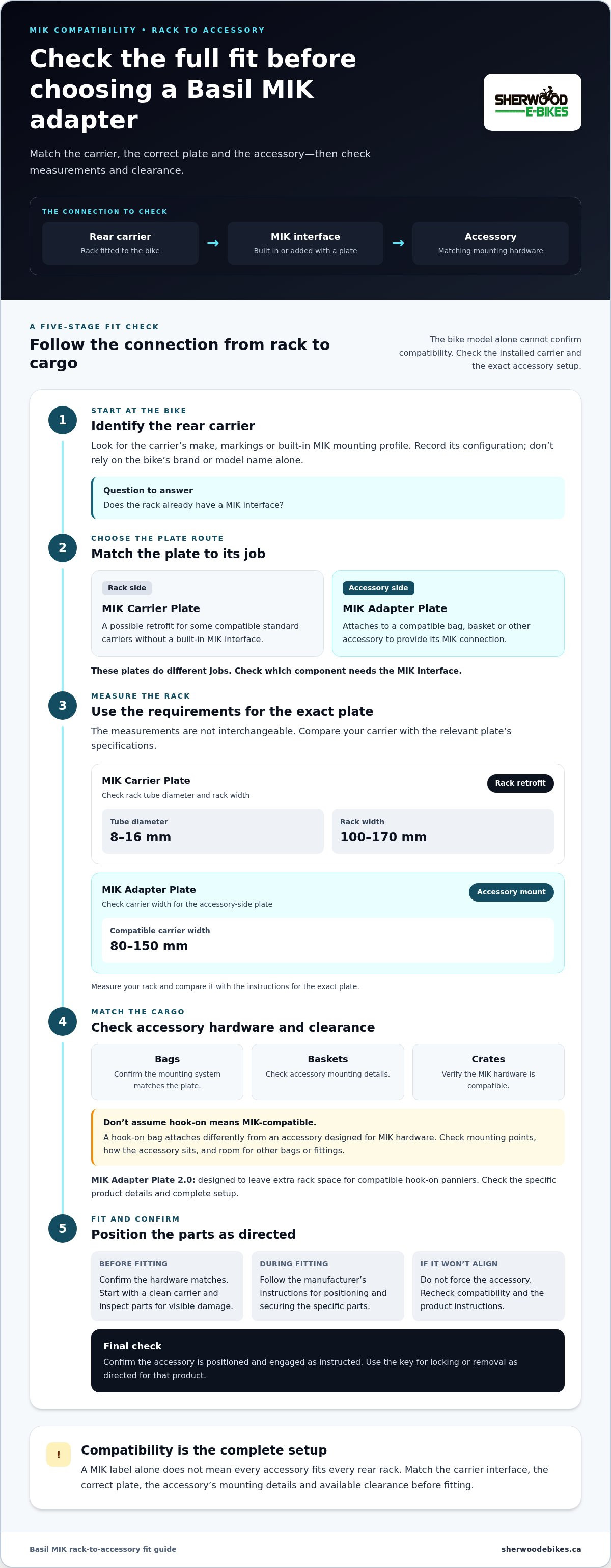
Think of the connection in this order: rack → MIK interface → accessory. The interface may be built into a MIK carrier or added with a compatible MIK Carrier Plate. The accessory needs the corresponding MIK mounting plate or hardware. When the parts match, the plate connects the carrier and accessory. Check the instructions for the specific products to see how their components should be positioned and secured.
Which accessories can use a Basil MIK adapter?
Basil’s MIK-compatible range includes baskets, crates and bags. Choose based on the cargo you carry and how you use your bike, but confirm that the accessory’s mounting system matches the plate and carrier. A bag with hooks attaches differently from an accessory designed for MIK hardware. Don’t assume a hook-on bag and a MIK plate will fit together simply because both are made for a rear carrier.
Think of MIK as a compatibility system, not a promise that every combination works. Identify the carrier interface, then check the accessory’s mounting details and the plate instructions. This helps you confirm which part belongs on the bike and which attaches to your cargo.
Will a Basil Adapter Fit Your E-Bike Rack and Accessory?
A Basil adapter does not guarantee that every rear rack and accessory will fit. Start with the carrier installed on your e-bike, then check its mounting interface, the accessory’s hardware and clearance around the assembled setup. The e-bike model alone cannot confirm compatibility. Even bikes of the same model may have different carriers or accessory configurations.
Use this fit check before choosing parts:
- Carrier: Identify the rear carrier’s make or markings. Check whether it has a built-in MIK interface.
- Adapter route: If the rack does not have a MIK interface, compare its shape and dimensions with the requirements for a MIK Carrier Plate.
- Accessory: Check that the bag, basket or crate has mounting hardware designed for the same MIK system.
- Clearance: Consider how the accessory sits on the rack and whether there is space for other bags or fittings you plan to use.
Check your rear carrier and plate
Don’t rely on the bike’s brand or model name alone. Look for MIK markings or a built-in mounting profile on the carrier, and note its make and configuration. If it is a standard carrier, a Basil MIK Carrier Plate may provide a retrofit option when the rack meets the plate’s fit requirements.
The MIK Carrier Plate is specified for carriers with tubes 8-16 mm in diameter and a rack width of 100-170 mm. The MIK Adapter Plate, which attaches to an accessory, is compatible with carriers 80-150 mm wide. These measurements apply to different parts of the system, so they are not interchangeable. Measure your rack and compare it with the instructions for the exact plate.
Check mounting points and available clearance
Compare the accessory’s mounting method with the plate. A MIK-ready bag is different from a hook-on pannier, even if both sit on the rear carrier. The Basil MIK Adapter Plate 2.0 is designed to leave extra rack space for compatible hook-on panniers. The rack, plate and bag still need to work together, so check the product details instead of assuming every combination fits.
Record the carrier configuration and accessory model before assessing the complete setup. Check that the mounting points align, the accessory sits as instructed and there is usable space for any additional cargo. The U.S. Consumer Product Safety Commission provides bicycle safety requirements for the U.S. market; this is not a rack-compatibility guide. Sherwood E-Bikes Ltd. provides e-bike service support for riders in Sherwood Park, Edmonton and nearby communities who need help assessing accessory fit.
How to Attach, Lock, and Remove a Basil MIK Adapter
A Basil MIK setup should click into place only when its parts are compatible and positioned as the manufacturer directs. Don’t force an accessory that does not align with the plate. Fitting and lock details can vary, so follow the instructions for your specific adapter and accessory.
Fit and check the accessory
- Confirm the hardware. Check that the rear carrier has a MIK interface or a compatible MIK Carrier Plate, and that the accessory’s mounting plate is intended for that system. Start with a clean carrier and inspect the parts for visible damage.
- Position the plate. If the adapter plate needs to be fitted to the bag or basket, follow its instructions for placement and fastening. Confirm that it sits as shown and does not interfere with the carrier.
- Attach the accessory. Align it with the carrier interface and engage it using the method in the manufacturer’s instructions. Stop if the parts do not line up; do not force them.
- Check engagement. Confirm the accessory is seated and retained before loading it. Follow the carrier and accessory instructions for load limits, and check that nothing obstructs moving parts or other fittings.
Before each ride, check the mounted accessory. If it shifts, sits unevenly or does not engage as intended, remove it and review the fit rather than carrying cargo in an uncertain setup.
Use the key and lock as intended
The MIK lock helps secure a compatible accessory to the carrier, but it does not guarantee protection from theft. Follow the instructions for your specific plate to lock the accessory after fitting and release the lock before removal. Confirm that the lock has engaged instead of assuming the click alone means it is locked.
MIK Key S and MIK Key L are distinct key options. Don’t choose one based on its size or name alone. Check the manufacturer’s documentation for your specific plate to identify the correct key and how it operates. Keep the key accessible and confirm that you can release the lock before setting off. If you remove the accessory regularly, include unlocking it in your routine.
Bike parking is one part of broader cycling infrastructure, but a rack or mounting standard does not replace a careful accessory fit check. For practical guidance with e-bike accessories and maintenance, explore Sherwood E-Bikes’ e-bike service support.
Which Basil Adapter Setup Suits Your Everyday Riding?
Choose a setup based on what you carry most often and how you use your bike. A basket, crate or bag can suit a different routine, but the carrier and accessory still need matching MIK hardware. Think about how you will load it, whether you will remove it during the day and how much rack space other bags need.
| Accessory type | Rider need | Compatibility check |
|---|---|---|
| Basket | Keep frequently used items visible and easy to reach during errands. | Confirm the basket has mounting hardware compatible with the carrier’s MIK interface or MIK Carrier Plate. |
| Crate | Carry items that are easier to place into an open container. | Check that the crate’s mounting points match the plate and sit securely on the rack. |
| Bag | Keep belongings together, with the option to take the bag indoors after a commute. | Check that the bag’s MIK hardware matches the carrier setup. Don’t assume a hook-on bag fits a MIK plate. |
Match the accessory to your routine
Consider the shape and access your regular cargo needs. A basket can make items easy to reach during short stops, while a crate offers an open space for loading. A bag keeps belongings contained and may suit a commute if you take it into work or a shop. If you remove an accessory often, factor that into your routine and follow the manufacturer’s instructions for its attachment system.
Plan for changes and extra bags
You may want to switch between a bag for commuting and a basket for errands. A MIK system can support accessory changes when the carrier, adapter and accessory are designed to work together. The Basil MIK Adapter Plate 2.0 is designed to leave room for compatible hook-on panniers, but it does not establish clearance for every rack or bag combination. Check the specific setup and how the mounted accessory affects access to pannier hooks and other fittings.
For more ideas, read Sherwood E-Bikes Ltd.’s Sherwood Park e-bike accessories guide. If you are choosing a basket, crate or bag for your e-bike, consider how its mounting system and dimensions work with your existing rack.
Get Help with E-Bike Accessory Fit in Sherwood Park and Edmonton
A good fit depends on all the parts working together: the carrier interface, the correct adapter, the accessory’s mounting system and clearance around the finished setup. If you are unsure whether a Basil adapter suits your e-bike, a hands-on assessment can help you understand how the rack and accessory connect before you ride with cargo.
Sherwood E-Bikes serves riders in Sherwood Park, Edmonton, Leduc, Camrose, Fort Saskatchewan, Ardrossan, St Albert, Vegriville, Morinville, Wetaskiwin and Spruce Grove. Local support is useful when carrier markings are hard to identify, mounting points are unfamiliar or you want to assess the bike, rack, adapter and accessory together. For related help with fit and upkeep, explore e-bike service and maintenance.
What to bring for an accessory-fit discussion
Bring the e-bike if practical so the rear carrier and its mounting points can be viewed directly. If that is not convenient, clear photos of the rack from above and from the side can show its labels and markings. Bring the intended accessory or its exact model information too. Seeing both sides of the connection makes it easier to assess how the components are designed to fit.
Describe your usual riding routine as well. Do you carry a work bag every day, switch accessories for errands or plan to leave one item mounted? That context helps focus the fit discussion on how you will use the setup. Mention any other bag that will share rack space.
Hands-on help is especially useful when the rack’s interface is unclear or you are unsure about clearance around the mounted accessory. Book a service appointment to have your e-bike and accessory assessed together.
For local e-bike parts, cycling accessories and maintenance support, explore Sherwood E-Bikes and choose components suited to your bike and everyday riding needs.
Choose a Setup That Fits Your Ride
A basil adapter is part of a compatible mounting system, not a universal fix for every rear rack. Before choosing an accessory, match the carrier interface to the correct plate and the bag, basket or crate. Then check that the parts engage as instructed and leave enough clearance for your setup.
Consider your daily routine, too. A removable bag may suit commuting, while a basket or crate may work better for other regular loads. Follow the manufacturer’s fitting and locking instructions, and check that the accessory is secure before riding.
Sherwood E-Bikes is a locally owned retailer serving Sherwood Park and surrounding communities, with e-bike parts, accessories and maintenance support available through the local store. Explore e-bike parts, accessories, and local support to plan a setup that fits your bike and the way you ride.
Frequently Asked Questions
What does a Basil MIK adapter do?
A Basil MIK adapter connects a compatible bag, basket or crate to a rear carrier with a matching MIK interface. The adapter plate fits on the accessory, while the carrier provides the corresponding mounting point. Some racks have MIK hardware built in; others may use a compatible MIK Carrier Plate. Since the basil adapter is one part of the setup, check the carrier and accessory details together.
Will a Basil MIK adapter fit any bike rack?
No. A Basil MIK adapter is not a universal rack fitting. Your rear carrier needs a compatible MIK interface or must accept a suitable MIK Carrier Plate, and the accessory needs matching mounting hardware. Check the plate’s fit requirements and the available rack clearance. Similar-looking racks may have different interfaces or dimensions, so compare the product instructions before buying or fitting components.
Can I use a Basil MIK adapter on an e-bike without an MIK carrier?
Possibly, if the e-bike’s rear carrier is compatible with a MIK Carrier Plate. This plate is intended to add a MIK interface to some non-MIK carriers. Basil specifies carrier tubes 8-16 mm in diameter and a rack width of 100-170 mm for the MIK Carrier Plate. Measure your rack and compare it with the manufacturer’s instructions. The e-bike model alone does not establish compatibility.
How do you attach a Basil MIK adapter plate?
First confirm that the carrier, plate and accessory are compatible. Fit the adapter plate to the bag or basket as directed by its manufacturer, then align the accessory with the carrier’s MIK interface and engage it according to the instructions. Check that it is seated and retained before loading it. Use the lock and key as directed, and do not force parts that do not line up.
What is the difference between MIK Key S and MIK Key L?
The key options suit different accessory routines. Basil describes the MIK Key S for riders who frequently attach and remove an accessory, while the MIK Key L is intended for those who leave an accessory locked on the bike. Check the documentation for your specific plate and key to confirm the correct use. Keep the key accessible and verify that the lock engages.
Can I use a hook-on bag with a Basil MIK adapter plate?
Some setups can accommodate both, but compatibility and clearance depend on the specific parts. Basil’s MIK Adapter Plate 2.0 is designed to leave extra space on the carrier for compatible hook-on panniers. That does not mean every pannier fits every rack or adapter. Check the carrier width, the position of the mounted accessory and the pannier’s hooks before combining them, and follow each product’s instructions.
Is a locked Basil MIK adapter theft-proof?
No. The lock helps secure a compatible accessory to the carrier, but it cannot guarantee that the accessory or bike will not be stolen. Lock the bike and accessory appropriately when leaving them unattended, and take removable valuables with you where practical. Keep the MIK key accessible for removal, and check that the lock is engaged rather than relying on the attachment click alone.


